








Skip to content
Cognivox Labs

AI AGENTS & WORKFLOW AUTOMATION

Connect AI to the work your business actually needs to get done.

We design AI-assisted workflows that connect business tools, knowledge and APIs — helping teams automate repetitive work, coordinate information and handle multi-step processes with human oversight where it matters.

PRACTICAL AUTOMATION

Automation becomes useful when it works across the systems your team already uses.

Repetitive work often sits between tools rather than inside one application — reading an email, checking a customer record, finding relevant information, preparing a response, updating a system and asking someone for approval. We turn those sequences into controlled workflows where conventional automation, AI and human decisions each handle the part they are suited for.

WHAT WE AUTOMATE

Workflows built around the process, not the AI buzzword.

The right automation depends on what triggers the work, which systems are involved and where judgement or approval is required.

  1. AI-Assisted Business Workflows

    Multi-step processes where AI interprets information, prepares outputs or supports decisions inside a structured workflow.

  2. Tool-Connected Assistants

    Assistants that retrieve information and interact with approved APIs, business systems and internal tools.

  3. Document & Communication Automation

    Emails, forms, documents and incoming requests routed through extraction, classification, drafting and review.

  4. Customer & Revenue Operations

    Support triage, CRM updates, lead research, follow-ups, meeting preparation and related customer-facing processes.

  5. Internal & Operational Automation

    Reporting, approvals, task routing, data synchronisation, internal requests and recurring operational workflows.

HOW AI WORKFLOWS OPERATE

Give AI context, tools and boundaries.

AI is one step inside a wider business process — surrounded by clean data ingestion, deterministic decision rules, human approval where needed, and structured audit logs.

  1. 01TRIGGER

    Initiate Workflow

    Inbound signal starts the workflow automatically.

    Email · Form submission · System event · Schedule

  2. 02CONTEXT

    Assemble Context

    Retrieve accurate information before taking action.

    Knowledge base · Customer records · Business data

  3. 03AI STEP

    Reason & Process

    Targeted model operation with bounded prompts.

    Classify · Extract · Understand · Draft

  4. 04DECISION

    Verify & Control

    Gate critical steps with deterministic checks or human sign-off.

    Deterministic rules · Confidence scoring · Human approval

  5. 05ACTION

    Execute Operations

    Perform authorized actions across target applications.

    Update CRM · Send message · Create task · Call API

  6. 06RECORD

    Persist & Audit

    Keep complete visibility over every execution step.

    Execution result · Status tracking · Audit trail

Architectural principle: AI operates as one bounded phase inside end-to-end orchestration — never as an unconstrained autonomous loop.

CONTROLLED AUTOMATION

Not every decision should be autonomous.

Workflows can combine deterministic rules, AI-assisted steps and human approval depending on the process, confidence level and consequences of the action.

APPROVAL POINTS

Require review before sensitive, expensive or irreversible actions.

PERMISSIONS

Limit which tools, information and actions a workflow can access.

FALLBACKS & ESCALATION

Route unclear situations and exceptions to the appropriate person.

AUDITABILITY

Record important workflow decisions, actions and outcomes where required.

TECHNOLOGY & INTEGRATIONS

Tools chosen around the workflow.

We combine automation platforms, AI models and business systems according to the process rather than forcing every project into the same stack.

Workflow Automation

Orchestration, triggers, schedules, webhooks and multi-step workflow automation.

n8n logo
Zapier logo
Make logo

AI & Agent Frameworks

Models and orchestration components selected around the reasoning, tool-use and context requirements of the workflow.

OpenAI logo
Anthropic / Claude logo
LangChain logo

Business Integrations

Connect workflows with communication, collaboration, CRM and everyday business systems.

Microsoft 365 logo
Google Workspace logo
Slack logo

Data & Custom Systems

Connect databases, internal software, APIs and custom backend services where packaged integrations are not enough.

PostgreSQL logo
Supabase logo
Python logo
Node.js logo

EXAMPLE WORKFLOWS

What this can look like in practice.

Concrete workflow architectures tailored to real business operations with controlled transitions and clear boundaries.

Support Request Triage

Incoming customer inquiries routed through automated classification, knowledge retrieval, and grounded reply drafting with review checkpoints.

Trigger

Inbound email / support ticket

Outcome

Consistent, accurate responses drafted in seconds and synced directly to CRM.

Pipeline Steps

  1. Step 01

    Incoming request

  2. Step 02AI Step

    Classify intent & priority

  3. Step 03

    Retrieve relevant knowledge

  4. Step 04AI Step

    Draft grounded response

  5. Step 05Human Check

    Human review where needed

  6. Step 06

    Update support / CRM system

HOW WE BUILD

Start with the workflow, then decide where AI belongs.

A deliberate five-stage methodology that guarantees production reliability, security, and measurable operational return.

  1. 01

    Understand

    Map the real process, users, systems, decisions, exceptions and pain points.

  2. 02

    Separate

    Identify what should be deterministic automation, what benefits from AI and what should remain human-controlled.

  3. 03

    Connect

    Integrate the necessary tools, APIs, knowledge sources and business data.

  4. 04

    Automate

    Implement workflow logic, AI steps, permissions, approval points and failure handling.

  5. 05

    Operate & Improve

    Monitor workflow runs, errors, cost and user feedback and refine the automation over time.

SELECTED WORK

Automation in production.

Customer Support Workflow Automation

Customer Support Workflow Automation

Customer Support Workflow Automation

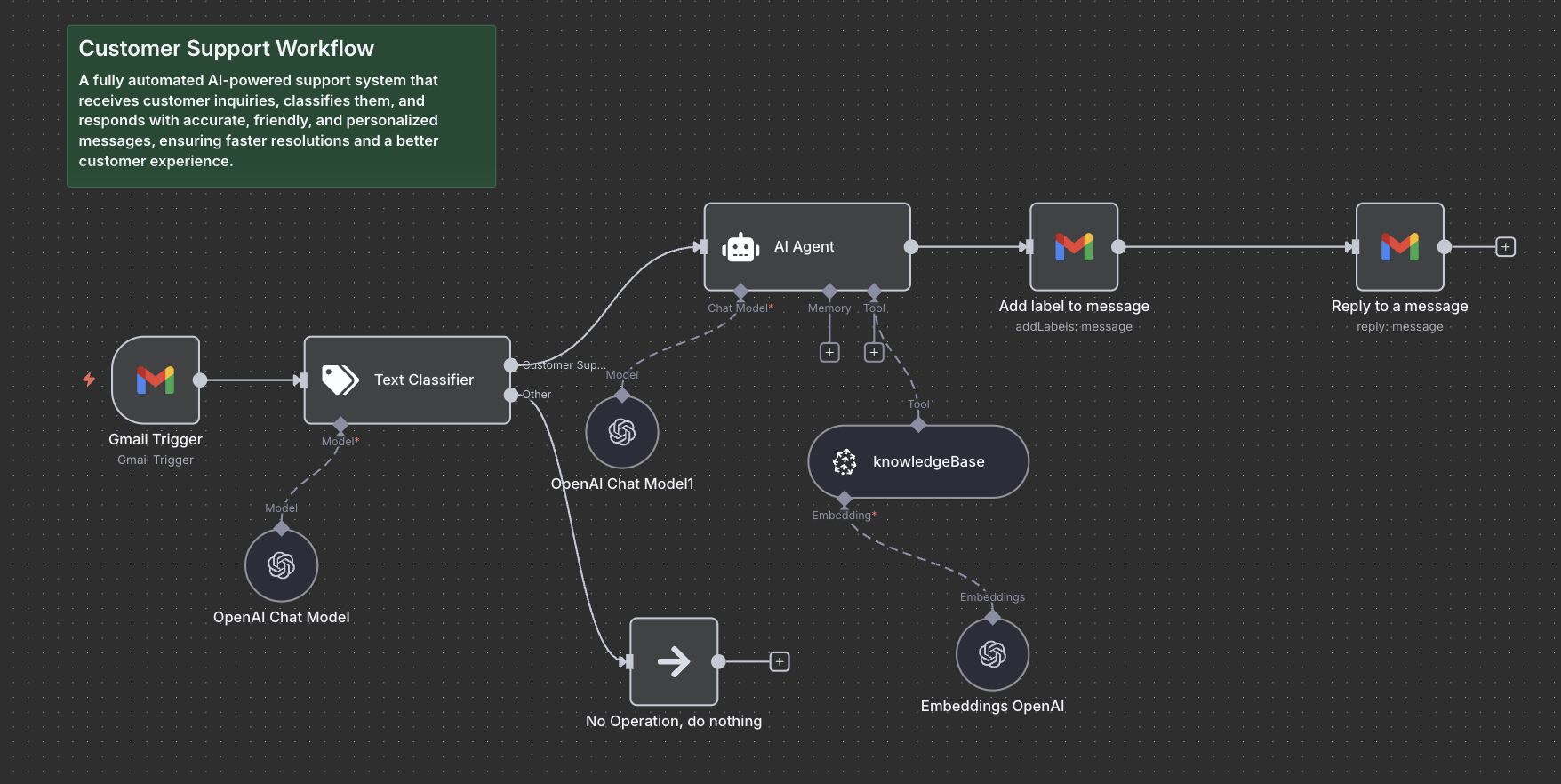
An AI-assisted support workflow engineered with n8n, OpenAI, and Gmail API. The system automates request intake, classifies intent, retrieves grounded knowledge, drafts brand-consistent responses, and preserves human oversight before dispatch.

  • ✓Automated Gmail intake & smart classification
  • ✓Vector database knowledge retrieval for grounded answers
  • ✓Draft reply generation with strict brand guidelines
  • ✓Human review checkpoint prior to sending
View case study

Production Automation & Matching

Semantic Search & Automated Matching Pipeline

View case study

Production automated matching pipeline connecting a Laravel platform to a Python / FastAPI semantic matching service. Engineered with asynchronous queue workers, automated triggers, daemon background processing, and zero-downtime deployment.

Automated background queue processingDual trigger architecture: automatic and manual controlSecure service boundary and authenticated communication

RELATED SERVICES

Need trusted company knowledge?

RAG & Knowledge Systems

Grounded retrieval, enterprise document search, and traceable answers that feed accurate context into your workflows.

RAG & Knowledge Systems

Need control over the underlying models?

AI Models & Multimodal Systems

Selecting, adapting, fine-tuning, and deploying specialized language and vision models for custom domains.

AI Models & Multimodal Systems
Need custom integrations, queues or database architecture?Backend & API Engineering

AUTOMATE THE WORK, NOT THE CONTROL

Have a workflow that should take less manual effort?

Show us the process, the systems involved and where your team currently spends time. We can help identify what should be automated, where AI adds value and where people should stay in control.

Discuss an automation project